Skip to the content
Saw Time. Core Time. Your Time.
The operating system for a concrete cutting company

One job. One record. From the quote to the paycheck.

The paperwork, without the paper. Dispatch it in the morning, cut it, get it signed on site — and the same record pays the man and bills the customer. One system, not four apps and a clipboard.

Works offlineBacked up daily
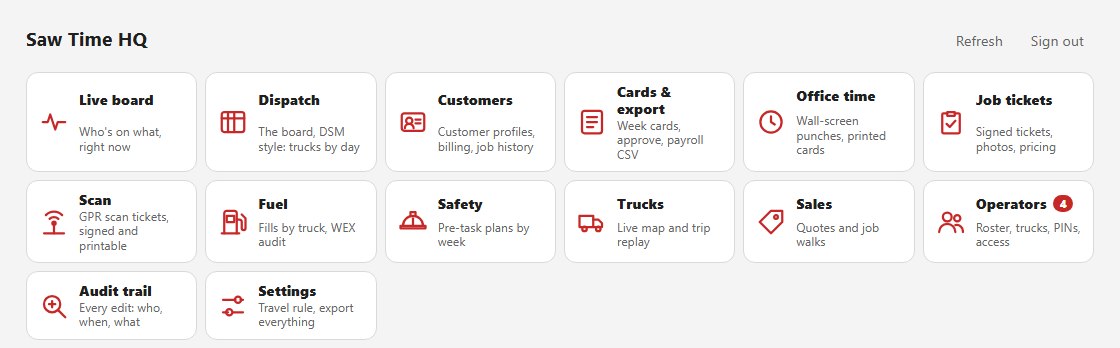
The Saw Time office hub: one tile for each department - live board, dispatch, customers, cards and export, office time, job tickets, scanning, fuel, safety, trucks, sales, operators, audit trail and settings This is the office. Every department behind one sign-in — and the same job number runs through all of it.

One job, all the way through

  1. Quoteon the walk
  2. Dispatchto his phone
  3. Work & signon site
  4. Payroll & billingWednesday

See how a job moves from the first quote to the signed ticket and time card, with the notes and photos attached.

Follow one job
What it does

One app on the truck. Everything at the office.

Dispatch & Billing

Send jobs to the crew’s phones. Follow their progress and see which signed tickets still need billing.

See dispatch & billing →

Field Ops

Track job, travel, and shop time. Record the work, photos, standby, and blade use. Get the customer’s signature before leaving the site.

See Field Ops →

Office & Payroll

Review time cards as the week happens. Correct missed punches with an audit trail, approve the hours, and export them for payroll.

See office & payroll →

Fuel

Log fills against the truck with pump and odometer photos. Compare the fuel-card statement with crew logs and investigate differences.

See the fuel audit →

Fleet GPS optional

See the trucks, replay their trips, and compare the trail with time cards and fuel logs. The office reviews flags; GPS never changes pay automatically.

See fleet GPS →

Safety

Pre-task plans, AHAs, toolbox talks and safety data sheets. Talk through the job, review the drafted plan, and have the crew sign on the phone before work starts. The first three print on your letterhead or download as a PDF; the data sheets open on any man's phone.

See safety →

Sales

Build quotes on the job walk with measurements, photos, and voice notes. Send the quote and carry the job details through to dispatch.

See sales →

Scan Reports

Keep scan findings, images, and the signed ticket together. The office uses those records to prepare the written report when the customer orders one.

See scan reports →

Shop & Equipment new

Your vendors one tap from their order page, a parts list that builds itself so the next order is one click, a service calendar for every truck and saw, and a shelf count that says LOW before you run out.

See the shop →
Direct accounting connectors are not available yet. Priced tickets go to your billing team with the signed ticket attached.
See it working — every department, start to finish →
Built for your company

Built around the way your company works

Your logo on the screens. Your time card and job ticket. Your pay week and travel rules.

We set up your company’s version and bring over your people and customers. Run it beside your existing paperwork before making the switch.

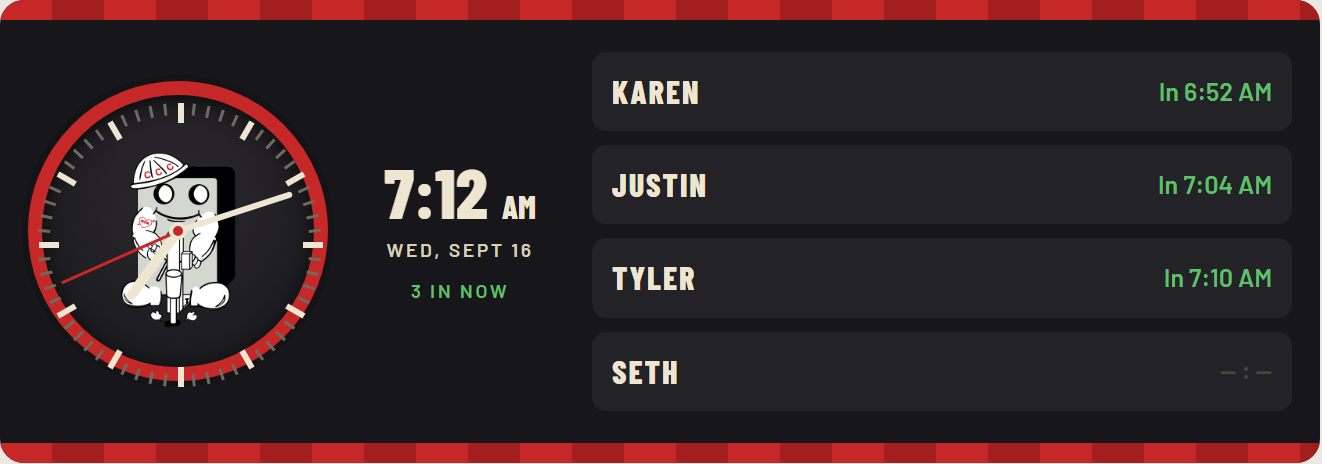
Office wall time clock
Wall clockOne company’s build
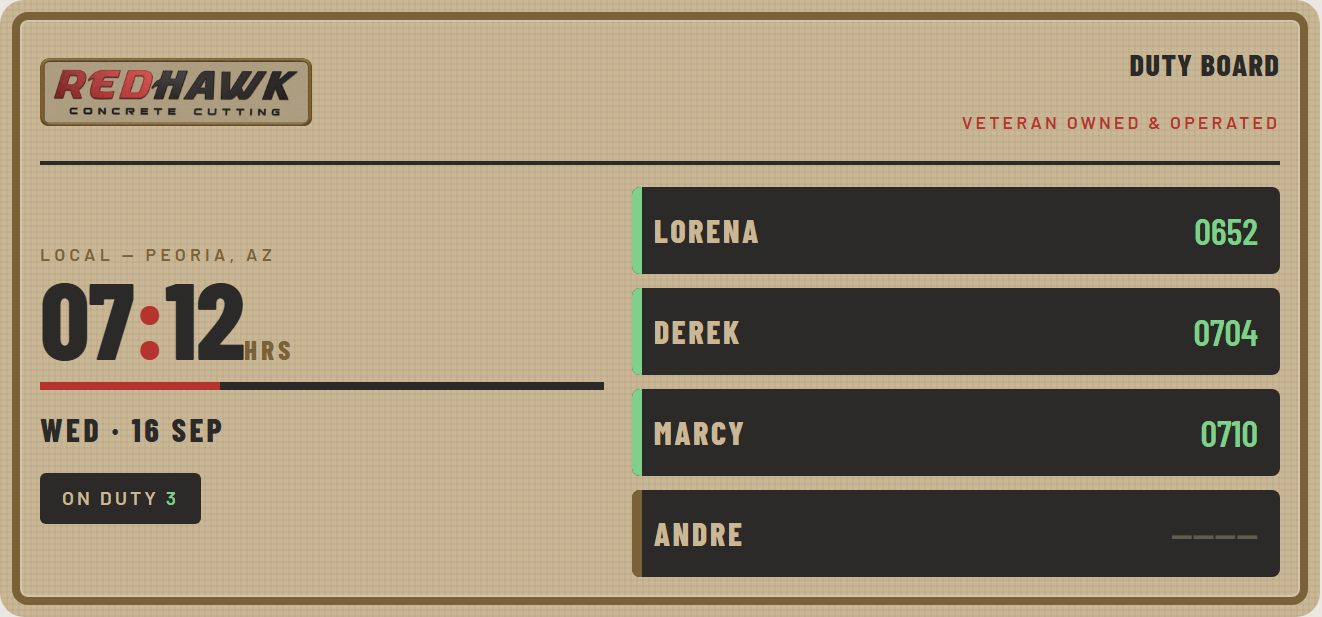
A second company's wall clock in its own design
Wall clockAnother company’s build

Two companies. Two builds.

Theirs was built for them. Yours is built for you.

3 in now · week ending Tue 9/8

Two different Saw Time customers let us show their office wall clocks. Put them side by side and they look nothing alike: their own brand, their own layout, their own payroll card. Same software underneath, built to each company.

  • Your pay week, your rules
  • Approve the whole week in one sitting
  • Every edit audited, nothing ever deleted
Open Office & Payroll
See setup and pricing
What it costs

Know the price before you call

$249 a month + $25 per truck. Unlimited people.

Optional fleet GPS adds $25 per tracked truck each month. Tracker hardware is quoted separately.

The one-time design fee is $1,850. On a twelve-month term, none is due up front and one twelfth is waived for each month you stay. If you leave early, the remaining design fee is due.

Calculate your price
Your data

Your records stay yours

Your company gets its own database. Export your records, photos, and signatures. Backups run nightly, and recovery is tested.

GPS exports include retained detail: approximately 90 days of full points, then trip summaries.

Read the security and data answers
Questions

Questions before you start

Does it work without cell signal?
Field entries save on the phone and sync when the connection returns. Send jobs to the phone before the crew heads somewhere without service.
Can you match our paperwork?
Yes. We build around your time card, job ticket, logo, pay week, and company rules.
Does it connect directly to our accounting software?
Not yet. The office sends priced tickets to your billing team with the signed ticket attached. We discuss your accounting package during setup.
How do we get started?
Leave your details below. We will reply asking for your current time card and job ticket, then show you how your paperwork would work in Saw Time.
See it for yourself

See it with your paperwork.

Leave your details and we will reply asking for your current time card and job ticket. See your forms, pay week, and rules in Saw Time before you decide.

The job tickets and time cards are clean and easy to read, which saves me so much time. I’m no longer waiting on operators to turn in their paperwork when payroll is due. I finish payroll much earlier and can move on to my other tasks.
— Dana, payroll · Concrete Coring Company

Rather write? hello@sawtimehq.com