Send the job. Work the job. Bill the job.
The board your office already knows, on a screen that talks to the trucks. The job goes out at four in the afternoon, the man opens his phone at five in the morning already knowing where he is going, and the board changes itself while he drives and cuts. Nobody phones in. Nobody types it twice.
Everything at the office, on one screen
This is the hub the office signs into. Every department is a tile — the live board, dispatch, customers, the week cards, the wall clock, job tickets, scanning, fuel, safety, the truck map, quotes, the roster, and an audit trail of every edit anyone made.
It is one system, not four apps and a clipboard. The same job number runs through all of it.
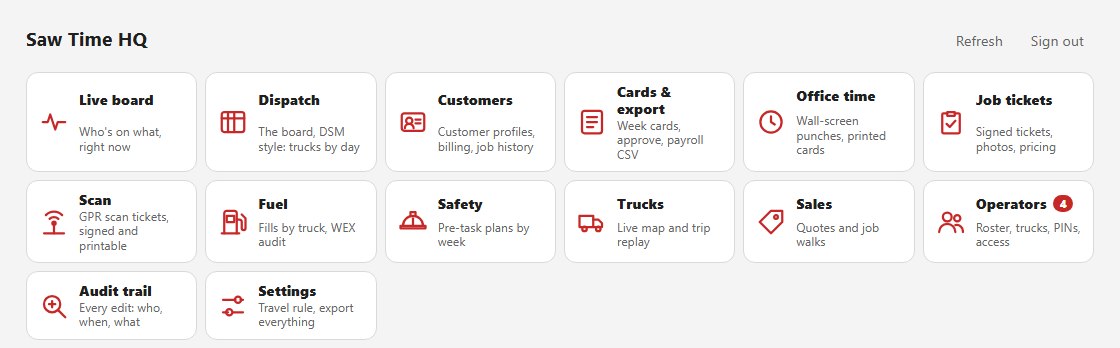
The office hub. Every department behind one sign-in.
The board your office already knows
The week runs across the top, the trucks down the side, the hours under each day. The function keys are where they have always been — Job Schedule, Worker Job List, Equipment Schedule, Trucks, Off Work — and so are the checkboxes and the status ladder. It was built that way on purpose: the person who has run dispatch for fifteen years should not have to learn a new trade to keep doing her job.
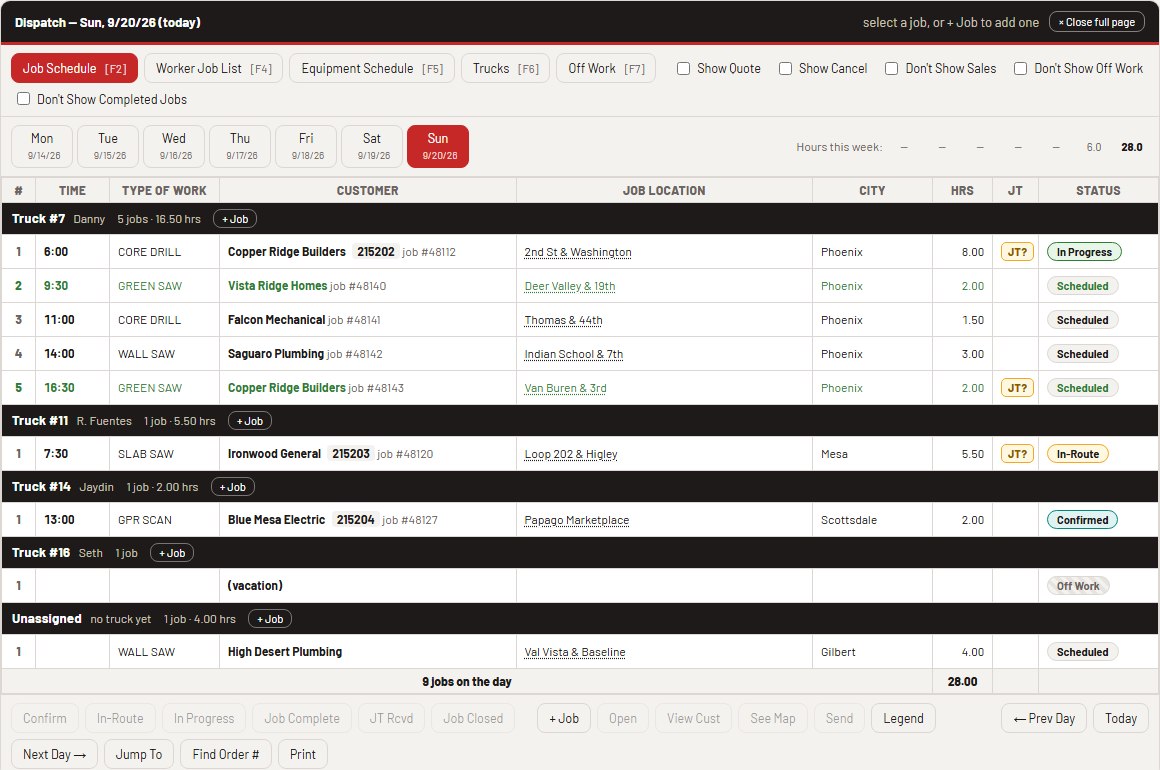
One day on the board. Truck #7 has five jobs; each one is its own numbered line.
- Every operator’s day is numbered 1, 2, 3 — in the order he will actually drive it.
- The first job of the day is marked red and a green cut is marked green — set when the job is entered, so the board reads at a glance from across the office.
- Every order carries its own number — 215202, 215203 — stamped by the system the moment the order is saved. That number is the thread through the ticket and the invoice, and no two dispatchers can ever be handed the same one.
- Job No. is still yours: the customer’s or the site’s own number, typed by the office, sitting right beside it.
He opens his phone already knowing where he is going
The crew takes the trucks home, so there is no yard to muster in. The jobs the office put on his truck are the first thing on his screen, above the big button he taps to start the day — where am I going, then start the clock.
Tap one and he has the whole sheet: a Directions button that opens the map app already on his phone, what he is doing, the equipment, the P.O., the site notes, and the contact as a button he can call with his thumb.
- Numbered and marked exactly like the office board — he and the dispatcher are looking at one thing.
- It works with no signal. In a basement it shows the cached copy and says when it was last updated, instead of pretending to be live.
- Start a job ticket for this job fills the ticket from what the office already typed. He is not copying an address off one screen onto another at six in the morning.
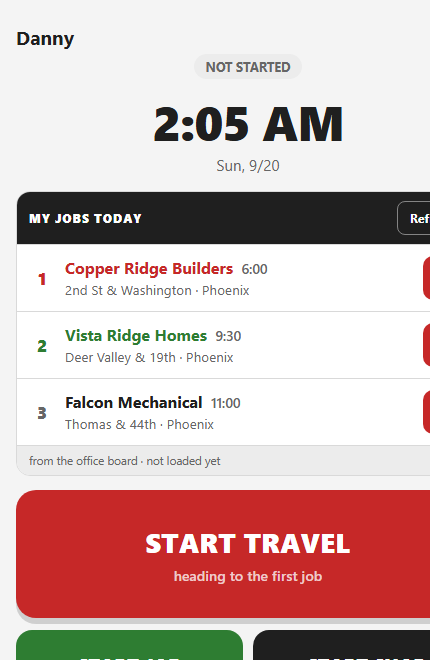
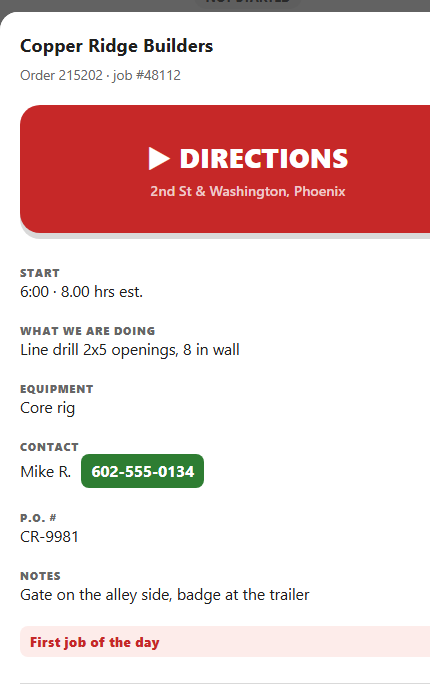
The board belongs to the office, so the phone only reads it. There is no Save on this screen and the database will not accept one — an operator can see his own truck’s jobs and nothing else, and that is enforced in the database, not in the app.
The board changes itself while he drives
He taps Start travel to begin his day on the time card. That is a punch — it is his pay. But the board is watching the same tap, and job 1 goes In route without him doing anything else. He arrives and punches onto the job: In progress. He rolls off it: Job complete, and the next job on his list goes In route behind him.
A man who starts in the shop never taps Start travel at all — he rolls out with Job complete, and that opens the same travel leg, so his first job goes In route just the same.
- The office stops being phoned. In route, on the job, job complete: the three things the dispatcher used to ask for are already on her screen.
- He can set them by hand too, from the job sheet, for the day that does not go the way the board said it would.
- The link runs one way. His punches move the board; the board never moves a punch. A wrong tap on dispatch must not be able to change what a man is paid.
- Every change is stamped with who and when — “truck 7” beside the office’s own entries — so the day can be read back later.
The job and its ticket find each other
The signed job ticket the customer put their name to on site comes back to the office and is linked to the job it came from. The board shows a JT pill: green once a signed ticket is attached, amber while one is still owed. Try to close a job that has none and the board asks the question it should ask — Job Ticket Has Not Been Entered!
- The link lives on the job, never on the ticket. A signed ticket is stone — the database will not let the office write to one at all, and that is deliberate.
- When a ticket comes in carrying the job number, the board points at it and the office confirms. No hunting.
Price it once, and nothing dies in the truck seat
The office prices the signed ticket in the hub and sends it to billing. Prices live beside the ticket, never on it, so the document the customer signed is never altered by what it was worth.
- Signed work nobody has billed raises a red panel — oldest first, age in days, dollars totaled. It is the first thing on the job tickets screen, and it will not go away until the work is sent to AR.
- The order number ties it together: the job on the board, the ticket the customer signed, and the invoice that follows all carry the same one.